macOS can’t ask for Touch ID before SSH uses your key. Its built-in
ssh-agent only remembers the key’s passphrase. To get a fingerprint prompt
for every ssh and git push, you point SSH at a different agent that asks
for Touch ID before it signs. Fydra, Secretive and 1Password all do this on a
Mac. This guide sets up Fydra’s agent step by step and shows where the others
fit.
A disclaimer: I make Fydra. The comparison below says where the other tools are the better choice.
Why the macOS ssh-agent doesn’t use Touch ID
When you run ssh or git push, the SSH client doesn’t read your key file
itself if an agent is running. It asks the agent, through a socket named in
SSH_AUTH_SOCK, to sign a challenge from the server. The agent decides
whether to sign.
The agent that comes with macOS signs whenever it’s asked. With
UseKeychain yes in ~/.ssh/config it also stores your passphrase in the
login Keychain, so you never type it again
(more on that in where to store SSH keys on a Mac).
That’s convenient, but it means any process running as you can use your key
without you noticing. A Touch ID agent adds the missing step: something on
your Mac asks for a signature, and you see which app and which key before
you allow it.
Your options on a Mac
| Fydra | Secretive | 1Password | |
|---|---|---|---|
| Touch ID before each use | Yes, remembered as you choose | Yes, or Apple Watch | Yes, remembered per app |
| Where the key lives | Encrypted Fydra vault | Secure Enclave of that Mac | 1Password vault |
| Use your existing keys | Yes, import Ed25519 or RSA | No, keys are created in the Secure Enclave | Yes |
| Same key on several Macs | Yes, through your iCloud | No, one key per Mac | Yes |
| Platforms | Mac (vault also on iPhone and iPad) | Mac | Mac, Windows, Linux |
| Price | Fydra Pro: €19.99 a year or €59.99 once | Free, open source | Part of a 1Password plan |
Pick Secretive if you want the strictest model and don’t mind one key per Mac: its keys are generated inside the Secure Enclave and can never be copied out. Pick 1Password if you already pay for it and work on Windows or Linux too. Pick Fydra if you want to keep the keys you already have, use the same key on every Mac, and keep your other secrets (API keys, notes, cards) in the same place. There’s a longer comparison in 1Password SSH agent alternatives, and a closer look at these three in Secretive vs 1Password vs Fydra.
Set up Touch ID for SSH with Fydra
You need macOS 14 Sonoma or later (on a Mac without Touch ID, the same prompt asks for your Mac password), Fydra for Mac, and Fydra Pro. The agent itself is a free download.
1. Put your SSH key in Fydra
Open Fydra on your Mac, click + and choose SSH Key. Then either:
- Generate New Key to create an Ed25519 or RSA key pair inside Fydra, or
- Import Existing Key and paste the private key, for example the contents
of
~/.ssh/id_ed25519.
The agent reads Ed25519 keys and RSA keys in PEM (PKCS#1) format. If your
key has a passphrase, Fydra shows a Copy Terminal Command button: paste
the command into Terminal, type the passphrase once, and paste the result
back. The command runs macOS’s own ssh-keygen on a temporary copy, so your
original file isn’t changed. From then on the key is protected by the vault
and Touch ID instead.
Once the key is in Fydra and you’ve checked that it works (step 4), you can
delete the file from ~/.ssh. Keep the public key (.pub) if other tools
read it.
2. Install the Fydra SSH Agent
The main app comes from the Mac App Store, which doesn’t let apps talk to your shell, so the agent is a separate download, notarized by Apple and signed by the same developer.
- Download it from the SSH agent page, open the
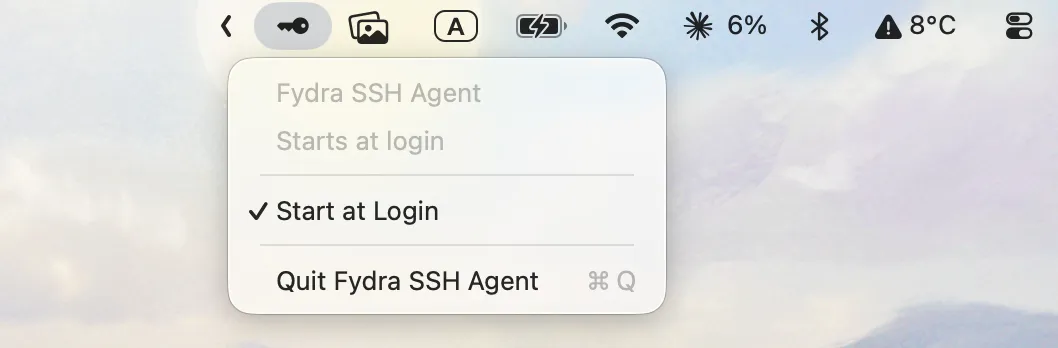
.dmgand drag Fydra SSH Agent to Applications. - Open it. A key icon appears in the menu bar.
- Click the icon and choose Start at Login, then allow it in System Settings > General > Login Items.
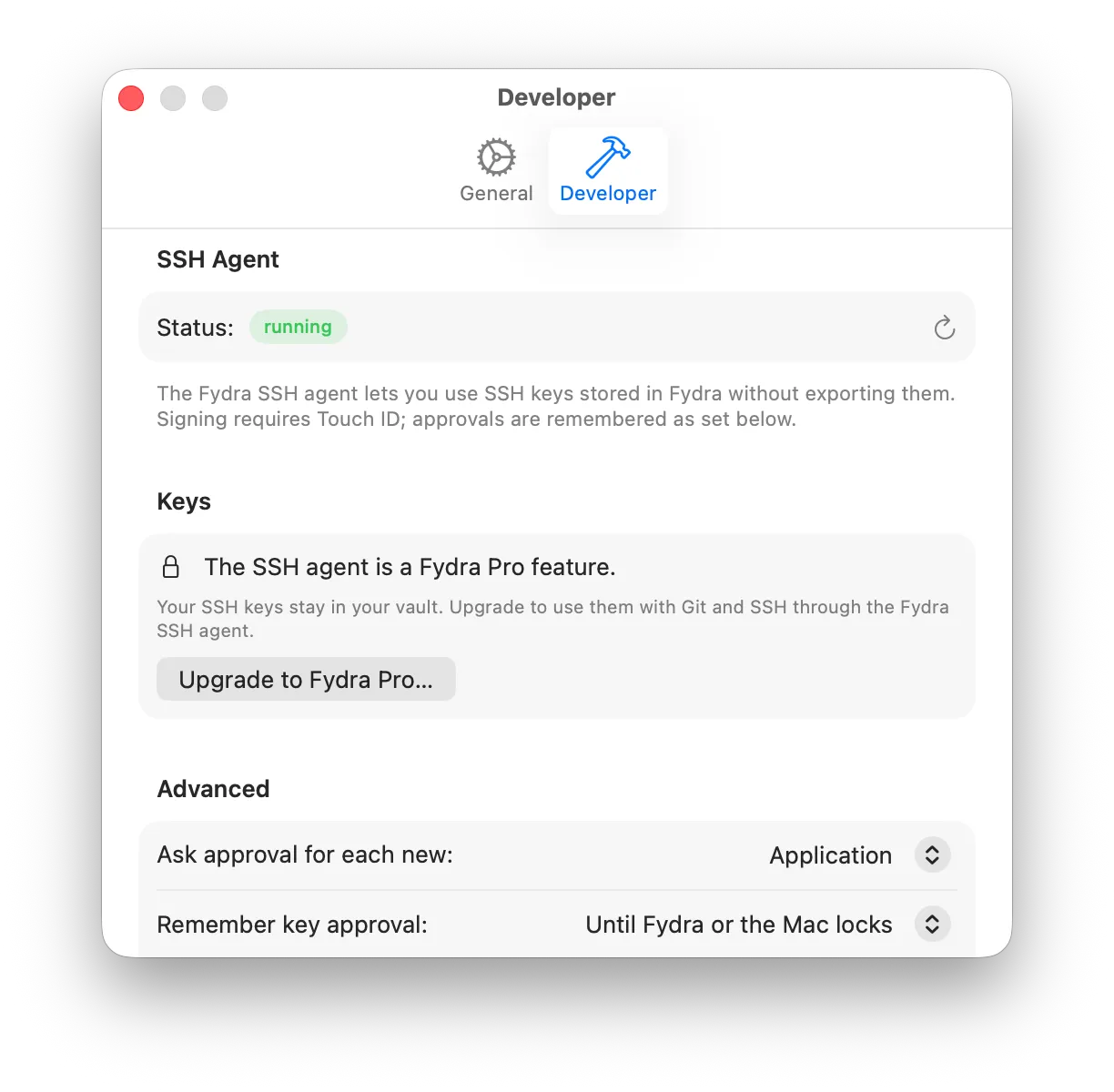
Open Fydra > Settings > Developer. The status should say running. With Fydra Pro, the Keys section lists the SSH keys the agent can use; without it, that section offers the upgrade, as in the screenshot below.
3. Point SSH at the agent
Add this line to ~/.zshrc (or ~/.bashrc), then open a new terminal:
export SSH_AUTH_SOCK="$HOME/Library/Group Containers/group.com.fydra.vault/ssh-agent.sock"That covers Terminal, iTerm2 and anything you start from them. Apps you open
from the Dock, such as some Git clients, don’t read ~/.zshrc. For those,
add the socket to ~/.ssh/config instead:
Host *
  IdentityAgent "~/Library/Group Containers/group.com.fydra.vault/ssh-agent.sock"
If an older IdentityAgent line points at 1Password or Secretive, remove it.
The first IdentityAgent that matches wins.
4. Test it
ssh-add -lYour Fydra keys are listed with their fingerprints. Now connect:
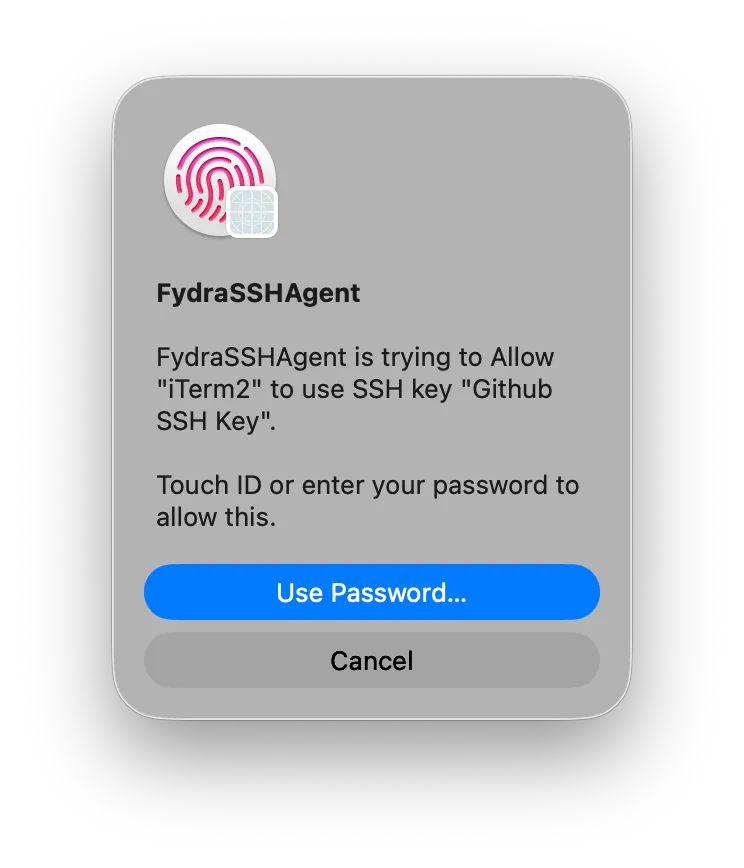
ssh -T git@github.comTouch ID asks whether the app you’re in may use the key. Touch the sensor, and GitHub greets you by name.
Choose how often Touch ID asks
Asking for every single signature sounds safest, but shell prompts and
editors run git fetch in the background, and a prompt every minute
teaches you to approve without reading. Fydra lets you choose, under
Settings > Developer > Advanced:
Ask approval for each new:
- Application (default): one approval covers one app, for example iTerm2 or VS Code.
- Terminal session: one approval covers one terminal tab or window.
- Never: one approval covers the key, whichever app asks.
Remember key approval:
- Until Fydra or the Mac locks (default), which also ends when the Mac sleeps.
- For 1 hour.
- Always ask, for a prompt on every signature.
Display key names when authorizing connections shows the key’s name from Fydra in the prompt, as in the screenshot above.
Git commit signing with the same key
The agent signs Git commits too, with the same prompt. Tell Git to sign with SSH and point it at your public key:
ssh-add -L | grep "ssh-ed25519" | head -n 1 > ~/.ssh/signing_key.pub
git config --global gpg.format ssh
git config --global user.signingkey ~/.ssh/signing_key.pub
git config --global commit.gpgsign true
Git signs through ssh-keygen, which only reads SSH_AUTH_SOCK, not
IdentityAgent, so keep the export line in ~/.zshrc even if you use
~/.ssh/config. On GitHub, add the same public key again under Settings >
SSH and GPG keys with the type Signing Key.
Troubleshooting
ssh-add -lsays “Could not open a connection to your authentication agent”: the terminal was open before you edited~/.zshrc. Open a new one, or runecho $SSH_AUTH_SOCKto check the path.- “The agent has no identities”: check that the agent is running (menu bar icon), that Fydra Pro is active, and that the key is an SSH Key item in Fydra. Open Fydra once after installing the agent so it hands over your keys.
- SSH still asks for a passphrase: SSH found a key file in
~/.sshand is using it directly. RemoveIdentityFilelines for that host, or move the old file away. - A Git app doesn’t prompt: it doesn’t see
SSH_AUTH_SOCK. Use theIdentityAgentsetting in~/.ssh/config.
Summary
- macOS’s own agent stores passphrases but never asks for Touch ID.
- An SSH agent with Touch ID asks before each use and never hands out the private key.
- With Fydra: add the key, install the agent, set
SSH_AUTH_SOCK, runssh-add -l.
Next: where to store SSH keys on a Mac, and the full SSH agent reference.
Frequently asked questions
Can macOS use Touch ID for SSH keys by itself?
No. The ssh-agent that ships with macOS can keep your key's passphrase in the Keychain, but it never asks for Touch ID before a key is used. For a Touch ID prompt you need a separate SSH agent, such as Fydra, Secretive or 1Password.
Does Touch ID work with Git over SSH?
Yes. Git uses the system ssh command, which asks the agent in SSH_AUTH_SOCK (or the IdentityAgent in ~/.ssh/config) for a signature. The agent shows the Touch ID prompt, so git push, git pull and git fetch all go through it.
Will I have to touch the sensor for every git fetch?
Not by default. Fydra remembers an approval per app until Fydra or your Mac locks, so one touch covers a terminal app's background fetches. You can narrow that to one terminal session or one hour, or choose Always ask to approve every signature.
Which key types does the Fydra SSH agent support?
Ed25519 keys, and RSA keys in PEM (PKCS#1) format. You can generate either kind in Fydra or import an existing private key.
Does my private key ever leave Fydra?
No. SSH clients only receive signatures. Fydra hands your keys to the agent encrypted, and no private key is written to disk unencrypted.